iPhone · Apple Watch optional · on the device
First your memory. Then your team’s.
Hintsight remembers what was promised and decided in your conversations. With the quote, on your iPhone.
- 5 hours free
- No Hintsight account
- No tracking
- Works without a watch
Who is it for?
Pick your example.
The question and the Moment card further down switch with it.
Work
Six months without a word, and you still know where you left off.
Example, made up
A client after six months
Mr Brandt is standing in the doorway. You haven’t spoken since April. Back then it was about maintenance, and in passing he told you about his daughter. Shortly after he starts talking, your watch shows you both again. You don’t open with “What’s new?” but with “How are Anne and the horse?”
“How are Anne and the horse?” instead of “What’s new?”
Personal
What you promised, and what’s coming up in the lives of your people.
Example, made up
Lena asks about dinner
Lena runs into you on the stairs and asks whether you two should go out for dinner again. You’re about to say “not this week”. A glance at your watch: her birthday is coming up, and you still haven’t sent her that recipe. You say: “Yes, I’d love to. And I’ll bring the recipe.” What the watch doesn’t show is in the app, just for you: you have said no to Lena 3 times lately.
“Yes, I’d love to. And I’ll bring the recipe.”
Education
What was agreed in office hours, and what came to you after the lecture.
Example, made up
Office hours and lecture
After the lecture you head for the exit and tap your watch: “Idea for chapter 2: start with the case study from the tutorial.” A note, processed straight away. Two weeks later you’re in Professor Kaya’s office hours. She starts talking, and your watch reminds you what you meant to send and by when.
“Idea for chapter 2: start with the case study from the tutorial.”
Research
A lab notebook you speak into, and meetings that lose nothing.
Example, made up
A dictated lab notebook
In the evening in the lab you speak into your lab notebook: “Discard series three, the pressure sensor was miscalibrated.” A note, not a form. Weeks later, in the group meeting, someone asks why the data is missing. You ask your memory and have the reason, with the date. And when Dr Yilmaz is standing in front of you, you know what she is still sending you.
“Discard series three, the pressure sensor was miscalibrated.”
How your memory grows
From a sentence to a commitment.
-
01
Conversation
Your watch or iPhone records. The transcript is made on the device.
-
02
Quote
Hintsight finds the sentence that matters. Word for word.
-
03
Commitment
It becomes what someone has to keep. With evidence, under Today.
Circles · Team graph
Three memories.
One shared picture.
Everyone shares what the team should know. Everything else stays on their iPhone.
Three nets, three iPhones. Nothing is shared. Only what each person allows is shared. No quotes, no audio. Two dates for the same handover. Under Today the next morning.
Example, made up
By default
Nothing shared. Every net stays on its own iPhone.
What the others see
- Decisions, commitments, deadlines, facts, open questions
- Your name in the circle and the date
- Never audio, quotes or worries
Today · understood differently
Hall 3 handover
- you
- 22 Oct
- Anna
- 24 Oct
Sort it out before the client notices.
- Nothing shared by default. You share a topic, a project or a place and see beforehand what the others will see.
- No quotes, no audio. What is shared: decisions, commitments, deadlines, facts and open questions.
- No boss access. No ranking of people. Circles run on iCloud, not on our server.
Ask your memory
Just ask.
Get proof back.
Every answer shows where it comes from. Tap a number.
Ask · WorkExample, made up
What was still open with Mr Brandt?
Hintsight
His reply on the maintenance quote is still open. He wanted to get back to you once the budget is set . It was decided to start with the South plant, because that’s where the older machines are . And: his daughter Anne rides .
Source 1 · Commitment · Mr Brandt14 Apr, 11:02
“I’ll get back to you on the maintenance quote once next year’s budget is set.”
Source 2 · Decision · Mr Brandt14 Apr, 11:15
“We’ll start with the South plant, that’s where the older machines are.”
Source 3 · Relationship · Mr Brandt14 Apr, 11:31
“My daughter Anne rides now, she’s at the stables every weekend.”
With your team
What’s the plan for the Hall 3 handover?
You committed to 22 Oct, according to Anna it’s 24 Oct. From the circle comes the statement, never the quote.
How circles workAsk · PersonalExample, made up
What did I promise Lena?
Hintsight
You wanted to send her the recipe for the lentil salad . And you agreed to help her move in November . Her birthday is on 30 Oct .
Source 1 · Commitment · you21 Sep, 19:40
“I’ll send you the recipe, I promise.”
Source 2 · Commitment · you3 Oct, 20:12
“Count me in for the move in November.”
Source 3 · Life event · Lena12 Mar, 18:05
“On 30 October I turn forty, and we’re celebrating.”
Ask · EducationExample, made up
What did Professor Kaya say about my outline?
Hintsight
Chapter 3 is dropped because it overlaps with chapter 2 . You send her the outline by 13 Nov, and you discuss it on 15 Nov . For chapter 2 you’d noted to start with the case study from the tutorial .
Source 1 · Decision · Professor Kaya8 Oct, 14:20
“Let’s drop chapter three, it overlaps with chapter two.”
Source 2 · Commitment · you8 Oct, 14:26
“I’ll send you the outline by the 13th, then we’ll discuss it on the 15th.”
Source 3 · Intention · you24 Sep, 11:48
“Idea for chapter two: start with the case study from the tutorial.”
Ask · ResearchExample, made up
Why did we discard series 3?
Hintsight
The pressure sensor was miscalibrated, you noted that on 2 Sep . It will be repeated after the recalibration on 20 Oct . Dr Yilmaz will send you the sample plan for it by 23 Oct .
Source 1 · Decision · you2 Sep, 18:05
“Discard series three, the pressure sensor was miscalibrated.”
Source 2 · Deadline · Dr Yilmaz9 Oct, 10:30
“Recalibration is on the 20th, then we start over.”
Source 3 · Commitment · Dr Yilmaz9 Oct, 10:34
“I’ll send you the sample plan by the 23rd.”
With your assistant
Your Claude now knows your conversations too.
Connect Hintsight to the assistant you already use. It asks your memory when it needs to and helps you get commitments done. Your iPhone answers; our server stores no content.
-
01
Connect
In Claude, add the address https://hintsight.app/mcp under “Connectors” and confirm on your iPhone. You don’t need a Hintsight account.
-
02
Ask
“What did I promise Jana?” Your assistant asks your memory when it needs to and works with the answer. It comes from your iPhone.
-
03
Get it done
One tap on “Do it with Claude” hands a commitment to your assistant. It drafts the email, suggests a time or sets up a document.
Day close: In the evening, your assistant picks up what you promised and is still open, and prepares it. Hintsight asks it for drafts and to send nothing; Hintsight can’t enforce that.
In the assistantExample, made up
Prepare me for my meeting with Mr Brandt.
Asked Hintsight · 4 results
Claude
Still open is his reply on the maintenance offer, once the budget is set. You decided to start with the South plant. You wanted to send him dates for the start there; that is still outstanding. Shall I draft the email?
Yes, please.
Hintsight: marked as prepared
Claude
The draft is in your email drafts. Sending is up to you. In Hintsight, the commitment now says “Prepared by Claude”.
- Only if you turn it on. Without a connection nothing goes to an outside assistant. You can pause or disconnect at any time under Settings → Connections.
- Every change asks your iPhone. Reading is the default. If you allow changes, ticking something off, for example, only counts once you confirm on your iPhone, and it can be undone (“Not true” until the app restarts, after that in the claim itself). Only the mark “prepared” is set by your assistant directly; you can take that back too.
- Honest about names. What your assistant asks for goes to Anthropic or OpenAI with names, under your account, and, as long as “Sentences from conversations” is on, with verbatim sentences. Never audio, voice or location.
- Your assistant is asked for drafts. Hintsight sends nothing and asks your assistant for drafts; Hintsight can’t enforce that. What it may do with its own tools, you decide in Claude or ChatGPT.
Claude: availableChatGPT: soon
Work · Example, made up
Right now: Brandt
- Owes you: Reply on the maintenance quote
- Personal: His daughter Anne rides
- Last spoke 6 months ago
Possible
Brandt?
Owes you: maintenance
Personal: Anne rides
Last time: 6 months ago
Personal · Example, made up
Right now: Lena
- Soon: Birthday · 30 Oct
- You have said no to Lena 3 times lately.
- You owe: Recipe for the lentil salad
- You owe: Help with the move · due 15 Nov
Possible
Lena?
Soon: birthday
You owe: recipe
You owe: the move
Only you see the pattern, in the app. Not on the watch, not on the lock screen, never in a circle. You can turn it off under Settings → Nudges and morning brief → “Patterns in relationships”.
Education · Example, made up
Right now: Kaya
- You owe: Send the outline · due 13 Nov
- Decided: Chapter 3 is dropped · on 8 Oct
- Last time: Reading list for the methods part · on 8 Oct
Possible
Kaya?
You owe: outline
Decided: chapter 3
Last time: reading list
Research · Example, made up
Right now: Yilmaz
- Owes you: Sample plan for the repeat · due 23 Oct
- You owe: Forward the calibration log
- Last time: Recalibration on 20 Oct · on 9 Oct
Possible
Yilmaz?
Owes you: sample plan
You owe: calibration log
Last time: recalibration
In the moment
Know before you say the first sentence.
When Hintsight recognises the person you’re talking to by their voice, your watch and iPhone show what is open between you and what matters in their life right now.
- Only if you turn it on
- Short voice samples are discarded afterwards
- Without a watch too, on the iPhone
A look inside the app
Five screens. One memory.
The screenshots show the German interface; the examples are made up.
-
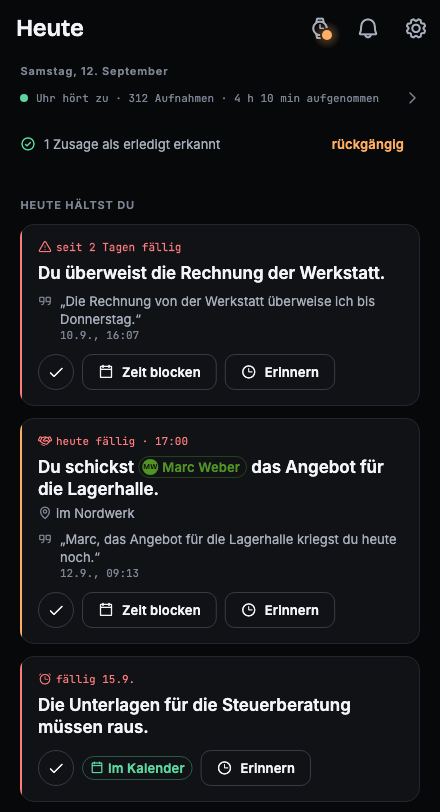
01 TodayWhat you have to keep today, each commitment with its sentence. -
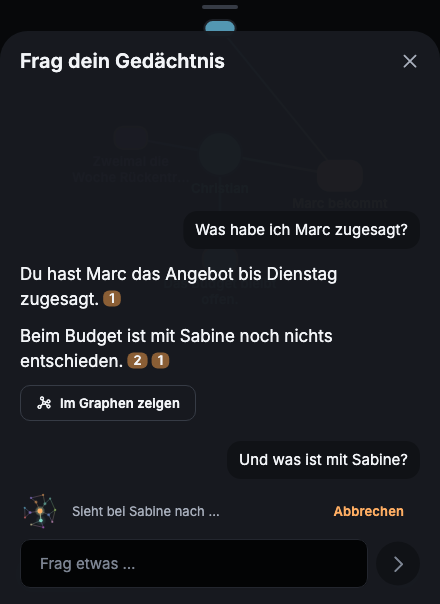
02 AskAnswers that point to their evidence. -
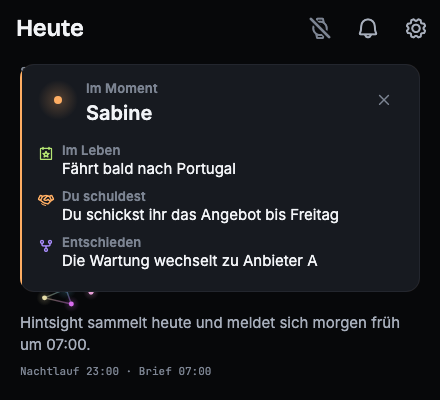
03 In the momentWhat matters before you say the first sentence. -
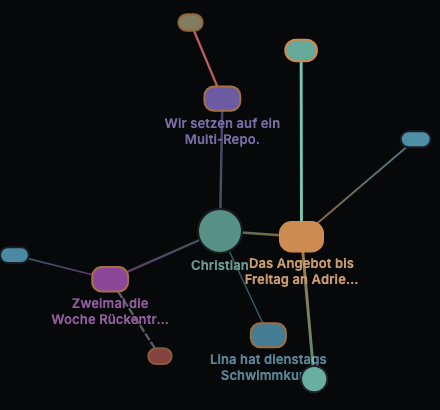
04 GraphPeople and statements as a net. -
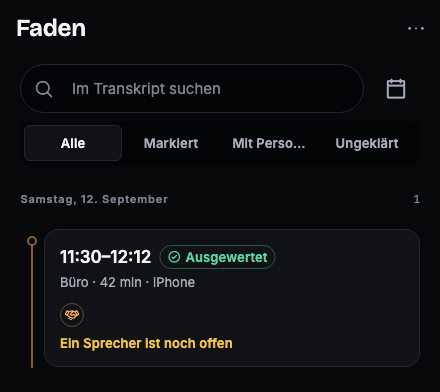
05 ThreadEvery conversation, searchable and ready to reread.


On your iPhone
“Anna, replaced by P_1 for analysis, says the handover is on 24 Oct.”
Leaves the device
Leak guard: no name found
Privacy by design
Your data stays with you.
Audio stays on your iPhone.
The device itself transcribes and tells speakers apart. In Germany and the EU, audio stays for 72 hours at most.
For analysis, names become P_1.
Before Hintsight sends text out for analysis. If a name from your list is still in it, it cancels. Only if you connect your own Claude or ChatGPT does it get names, and only what it asks for.
No account. No tracking.
There is no Hintsight account. Our server passes on text for analysis and answers to your assistant, and stores no content.
Your data at a glance: what stays, what leaves, what doesn’t exist
Stays on the iPhone
- Audio, in Germany, the EU and the United Kingdom 72 hours at most, elsewhere up to 30 days; only until transcription if you choose. Not included in the iCloud device backup.
- Transcripts, statements, people in the app’s database, until you delete them. It is part of your iCloud device backup if you have turned that on.
- Voice vectors: your own voice and those of people who have consented. Unnamed voices only where the law allows it without consent; they expire after 30 days.
- Your events for the next 14 days for “Today”, read from the iPhone’s calendar.
- A diagnostic log of the background runs, without content, 14 days.
- The coordinates behind a place name.
- Your API key in the iPhone’s keychain, if you use your own.
- What others share with you from a circle, kept apart from your own statements. It disappears when they withdraw it or you leave the circle.
Leaves the device
- Pseudonymised texts for analysis, by one of two routes: with your own key directly to Anthropic or OpenAI (USA); otherwise via the Hintsight proxy in Germany to OpenAI, which we run from the launch of the starter allowance and subscriptions. The proxy stores no content and not your IP address. Nothing goes out without your consent to the AI analysis. Along with the text go the conversation’s start and duration, a short context line (such as time of day, movement, surroundings) and, for nudges, upcoming events.
- Only if you connect: answers to the questions of your own Claude or ChatGPT, with people’s names, events as they appear in your calendar and, as long as “Sentences from conversations” is on (on by default), verbatim sentences. They travel through our server in Germany, which only passes them on, to Anthropic or OpenAI under your account. To wake the app, the server sends a notification without content via Apple. Never audio, voice or your location. Pause or disconnect at any time under Settings → Connections.
- For the allowance: an anonymous device key from Apple’s App Attest and, with a subscription, your subscription number from Apple. No name, no email.
- Subscription via the App Store. Apple handles purchase and payment.
- Price table: without your own key, the app fetches the current prices from the proxy at most once a day, without an identifier and without content.
- Circles via iCloud, only if you use a circle: the statements you share (no quotes, people from outside only by role), the name of the topic or project (encrypted), the circle name (Apple also sees it, as the invitation title), your display name from iCloud, and markers derived from the place and time of the conversation that reveal neither. Stored encrypted, readable by the people in the circle. Apple sees who is in a circle with whom, not the content. When someone in the circle uses “Ask your memory”, matching shared statements go, pseudonymised, to that person’s AI analysis.
- Place names: to look up the name of a place, a coordinate goes to Apple (MapKit). Can be switched off.
- Model downloads from GitHub and Hugging Face. Your IP address is transmitted in the process.
- Apple services such as the language data for recognition, the iCloud device backup if you use it, and the connection to the watch.
Does not exist
- No Hintsight account, no sign-in with name or email.
- No boss access: nobody sees what you don’t share – not even the person who created the circle.
- No central store of your memories: only what is shared lies, encrypted, in the iCloud of the person who created the circle.
- No ranking of people, no counters, no leaderboards.
- No content stored on our server.
- No analytics, no tracking, no ads.
- No crash reports; the diagnostic log stays on the iPhone.
- Your data is never sold.
All the details, with legal bases and your rights, are in the privacy policy.
Pricing
5 hours free. Then your choice.
-
Starter
€0
5 conversation hours
Once, to start. No key needed.
-
Plus
€29.99 a month
40 conversation hours a month
Subscription, no key of your own.
-
Pro
€49.99 a month
80 conversation hours a month
Subscription, no key of your own.
-
Hintsight
€9.99 a month
With your own key
From Anthropic or OpenAI. The provider bills you directly for the analysis.
You buy subscriptions in the app via the App Store. Without a subscription, everything you record is kept and analysed later. Connecting your own Claude or ChatGPT is included in every plan.
Frequently asked questions
Recording and the app
Do I need an Apple Watch?
No. The iPhone microphone is a full source, also with AirPods or another Bluetooth microphone. All analyses also work without a watch. With the watch you also get automatic recording within the time window and the floating thought on your wrist.
Am I allowed to simply record conversations?
No, not without more. In Germany, recording the privately spoken word of another person without their consent is a criminal offence under Section 201 of the German Criminal Code (StGB). Other countries have their own rules. You therefore need the consent of everyone you record, and you are responsible for it yourself.
Hintsight helps with that: every recording starts with a vibration and a sound, “Quick ask” shows the person you are talking to a sentence and a QR code to the information page for conversation partners, and it only records once you have confirmed the legal notice, shows you a sentence on the legal situation in your jurisdiction next to your decisions, and lets you decide whose voices are kept. This is not legal advice.
How does the watch record?
Within the time window you set, the watch starts by itself as soon as someone speaks. Alternatively it records only when you tap, or pauses entirely. Every recording starts with a vibration and a sound. Recordings without a recognisable conversation are discarded by the iPhone when they arrive.
Default: automatic, 07:00–23:00; in Germany, Austria and Switzerland by hand until you confirm that you inform everyone present. While recording, iPhone and Apple Watch show the system’s orange dot; Hintsight cannot hide it.
What happens after the conversation?
Speech recognition runs with Apple’s recogniser on the iPhone, and so does speaker separation. Then pseudonymised texts go to an AI model, which extracts statements with quotes: facts, decisions, commitments, open questions, deadlines, life events, preferences, intentions, concerns and relationships.
The overnight run connects what is new with what is already there, ideally while the phone is charging (default 23:00). If work piles up, Hintsight tells you; “Process now” works through the backlog visibly. If Hintsight cannot find a matching quote for a statement, it asks you instead of guessing.
How does Hintsight know who is speaking?
During setup you enrol your voice. That is how Hintsight knows which sentences are yours. It recognises other people’s voices once they have consented; where the law allows it without consent, as in many US states, it also recognises unnamed voices across conversations. With “Who was that?” you give a voice a name.
What does the app show me?
- Today: what you have to keep today, sorted by due date. With one tap a commitment becomes a calendar block or a reminder, always after a preview first. Below it, the horizon of the next 14 days.
- Thread: every conversation in order, with its transcript and, as long as you keep it, the audio. Searchable by words, people and days.
- Graph: people, statements and their connections as a net or as a list.
- People: what is open between you, what you have decided and what is going on in their life right now.
- Decision help: when a new decision reverses an earlier one, Hintsight shows what applied back then, with the quote from that time.
- Morning brief, pre-briefing, nudges: a short overview in the morning, the open points with a person before a meeting, and a few nudges in between (default: brief 07:00, at most 5 nudges a day). By default the lock screen shows only a neutral line.
What belongs to a conversation?
Time, calendar event, rough location (a remembered place or the city, never the street), background sound and movement. Location and movement can be switched off. A short context line derived from this goes to the AI model along with the text.
Which languages does Hintsight understand?
German, English, Spanish and Italian, in the interface and in conversations. You set the language of your conversations; by default it follows the interface language. The conversation language is not detected automatically. Quotes are kept word for word.
Circles
What is a circle?
A group of people who use Hintsight: your team, a building site or your home. Everyone shares what they choose as a topic, project or place: decisions, commitments, deadlines, facts and open questions. Hintsight compares it and shows you where things don’t match.
You create a circle, give it a name, like “Office”, “Lindenstraße site” or “Home”, and invite people – by message, email or link. The person who created the circle can invite. Hintsight works fine without a circle too.
Can my boss see what I record?
No. There’s no admin or boss access. Your recordings, transcripts and any statements you don’t share are seen by no one but you.
Hintsight doesn’t measure who talks how much or who keeps promises, and doesn’t count who shares how much. Only the person who owns a recording can share from it, and nothing is shared by default.
What do the others in the circle see?
Only decisions, commitments, deadlines, facts and open questions from the topics, projects or the place you share; only confirmed statements, with your name in the circle and when it was said. Never recordings, transcripts or quotes, never names of people outside the circle as far as Hintsight knows them, and never exactly where you talked. Worries, intentions, life events, relationships and preferences are never shared.
Before you share, “What the others see” shows exactly the sentences that go out; the “Shared” overview under People shows what you share with whom.
When does Hintsight show “understood differently”?
If you were in the same conversation at the circle’s place and remember it differently, such as a different deadline, Hintsight shows it the next morning. If it matches, it says “Anna heard it the same way”.
If two people promise the same thing, or a deadline differs between you and Anna, Hintsight notices even if you weren’t together. In the “Home” circle this is off: there Hintsight only compares when you were both in the same conversation at the circle’s place.
What about people I talk to who aren’t in the circle?
Hintsight replaces their names with their role, such as “the structural engineer”, or with “someone outside”. Quotes are never shared. If there’s any doubt whether a name is in a sentence, the sentence isn’t shared. A name Hintsight doesn’t know at all can slip through – so check the “What the others see” preview.
You may only share what you’re allowed to share – see the terms of use.
Do I need a server or a company account?
No. A circle is a shared space in the iCloud of the person who created it. Apple provides the invite, storage and notification; Hintsight runs no server of its own for this. What you share is stored there encrypted. Apple can see who is in a circle with whom and when it syncs, but not what is shared. Only the circle name is visible to Apple, as the invitation title, so pick one without anything confidential.
There’s no company account. Everyone in the circle needs an iPhone with Hintsight and an iCloud account. Details are in the privacy policy.
What happens when someone leaves the circle?
What they shared disappears for the others. What the others shared disappears for them. The same goes when you stop sharing a topic or project: it disappears at the next sync.
If the person who created the circle leaves, the circle ends for everyone.
How soon do the others see what I share?
Not live. Hintsight syncs after the overnight run, when you open the app, when you change what you share, or when you tap “Sync now”. The others get it at their next sync. Without a connection Hintsight waits and catches up.
What are circles good for?
Building site: in the circle “Lindenstraße site” everyone shares what was discussed at that place. Along the way you get a site diary built from conversations, across all trades – with the date and source of every statement.
Office and agency: you compare commitments and deadlines. Whoever joins the project sees on day one what’s decided and what’s open. Ask “What did we promise the client?” and Hintsight answers with a source: “according to Anna, 12 Sep.”
Home: who took on what is visible to everyone in the circle. Hintsight doesn’t compare who said what there – only when you were both in the same conversation at the circle’s place.
Do circles work with Android?
No. Hintsight is iPhone-only, and circles need an iCloud account. Without iCloud only “Circles” stays closed; everything else keeps working.
With Claude or ChatGPT
Can I use Hintsight with Claude or ChatGPT?
Yes, with Claude right now. In Claude, open the settings, then “Connectors”, add a custom one and enter https://hintsight.app/mcp. You confirm on your iPhone in Hintsight, via a link, a QR code or a six-digit code. You don’t need a Hintsight account, but you do need to have agreed to the AI analysis in Hintsight.
Then your assistant can ask, for example “What did I promise Jana?”. With “Do it with Claude” you hand it a commitment, and with “Day close” it prepares drafts for your open commitments in the evening. You’ll find the text for this evening task in Hintsight under Connections.
In ChatGPT this currently works only with Business or Enterprise, in developer mode. Plus and Pro follow once OpenAI accepts Hintsight into its directory.
The answers come from your iPhone. If it is off or offline, your assistant only gets a note that Hintsight is not answering right now. Sometimes a notification asks you to open the app for a moment.
Do Anthropic or OpenAI see my conversations then?
Not your conversations as a whole, but what your assistant asks for: matching statements, commitments and events, with people’s names and, as long as “Sentences from conversations” is on (on by default), verbatim sentences, including what others said. That goes to Anthropic or OpenAI under your account, and their terms apply. Pseudonymisation does not apply to these answers.
Never sent: audio, voice features, your location, statements you have not yet confirmed, and what others share with you in a circle. Places Hintsight knows are left out; a place that only appears in an event or a verbatim sentence can get through. Under “Access log” you see every question with its time and number of results, never the content.
If you use Hintsight for work, only connect a Business or Enterprise account covered by a data processing agreement with the provider. And check in your assistant whether your chats are used for training; if you don’t want that, turn it off there.
Can my assistant delete or send anything?
It cannot delete conversations, transcripts or audio. By default it may only read. If you choose “Change with confirmation” under Settings → Connections, it can suggest ticking off a commitment, setting a deadline, remembering something or marking a claim as “Not true”. That only counts once you confirm it on your iPhone, right in the notification or in Hintsight, and can be undone under “Access log”; “Not true”, though, only until the app restarts, after that in the claim itself. If you don’t confirm, the suggestion expires after 7 days. Only the mark “prepared” is set by your assistant without asking; you can take that back too.
Sending: Hintsight sends nothing. Your assistant writes drafts, such as an email or a suggested time, and you send them. Hintsight explicitly asks it to; it cannot enforce it. What your assistant may do with its own tools, for example in your mailbox, you decide in Claude or ChatGPT.
Costs and data
What does Hintsight cost?
The app is free and includes 5 conversation hours of analysis once, without a key. After that you choose a subscription: Plus (40 conversation hours a month, €29.99 a month) or Pro (80 hours, €49.99 a month) – or Hintsight (€9.99 a month) with your own Anthropic or OpenAI key; that provider then bills you for the analysis. You buy subscriptions in the app via the App Store.
Without a subscription everything you record is kept and analysed later. With your own key, Hintsight shows the cost of every run and stops as soon as the estimated costs reach your daily limit (default 10 US dollars). Details are in the terms of use.
How do I get an API key?
Only needed if you choose the Hintsight subscription with your own key. You create an account with Anthropic or OpenAI, add a payment method there and generate a key. You enter it in Hintsight during setup. It is stored in your iPhone’s keychain and used only for requests to that provider. You have your own contract with the provider.
How long is audio kept?
In Germany, the EU, the EEA, Switzerland and the United Kingdom audio stays for 72 hours at most, or only until transcription if you choose. In other countries you choose up to 30 days. What counts is the jurisdiction you set in the app. Audio never leaves your iPhone.
Before anything is recorded, you confirm a legal notice and make six decisions, such as whose voices are kept, each with a date. Until you confirm them, the cautious setting applies.
Which data leaves my iPhone?
- Pseudonymised texts for analysis: with your own key directly to Anthropic or OpenAI, otherwise via the Hintsight proxy in Germany to OpenAI, which we run from the launch of the starter allowance and subscriptions. People appear as P_1, P_2, voices as V_1, V_2. The text is accompanied by the start and duration of the conversation, a short context line and upcoming events for nudges. Audio, voice vectors and coordinates are never sent.
- Only if you connect Claude or ChatGPT: answers to their questions, with people’s names and, as long as “Sentences from conversations” is on, verbatim sentences, through our server to Anthropic or OpenAI under your account. Pseudonymisation does not apply to these.
- For the allowance, an anonymous device key from Apple’s App Attest and, with a subscription, your subscription number from Apple. Without your own key, at most once a day a request for the price table, without an identifier.
- If you use a circle: the statements you share, encrypted in iCloud, without quotes and without the names of people outside the circle that Hintsight knows. Apple sees the circle name as the invitation title.
- A coordinate to Apple (MapKit) to find the name of a place. This can be switched off.
- Your IP address to GitHub and Hugging Face when the models are downloaded.
- What Apple services need: language data for recognition, the iCloud device backup if you use it, iCloud Keychain and the connection to the watch.
No content is stored on our server. More in the privacy policy.
How do I delete my data?
- You delete single conversations, whole days or periods in the app.
- Hintsight deletes audio itself after the period you have chosen.
- Unnamed voices expire after 30 days, where they exist.
- To delete everything at once, use “Delete all data” in the settings; this also deletes your device data on the Hintsight proxy, and the app then starts afresh. If you are in a circle, leave it first; otherwise what you shared stays in iCloud and visible to the others.
- To withdraw what you shared in a circle, tap “Stop sharing” under “Shared” or leave the circle.
If you have turned on the iCloud device backup, the app’s database is included in it, the audio is not. That copy remains until you delete the backup or it is overwritten. Before deleting, you can take your memory with you: Settings → Data → “Export memory” creates a file with people, claims and conversation transcripts, plus saved places with coordinates, appointments with attendees, dossiers and nudges, without audio. It holds names and places in plain text; Hintsight keeps no copy.
Remove your API key in the app before uninstalling, or revoke it with the provider, because iOS may keep it in the keychain when the app is deleted.

First your memory.
What you need
- iPhone with iOS 26
- Apple Watch optional, watchOS 11
- Analysis starter, subscription or own key
- Circles optional, with iCloud